What Is an MCP Server?
A plain-English guide to Model Context Protocol, MCP connectors, and why companies may need custom MCP servers to make AI work with locked business systems.
In this article
Your AI agent is only as useful as the systems it can reach.
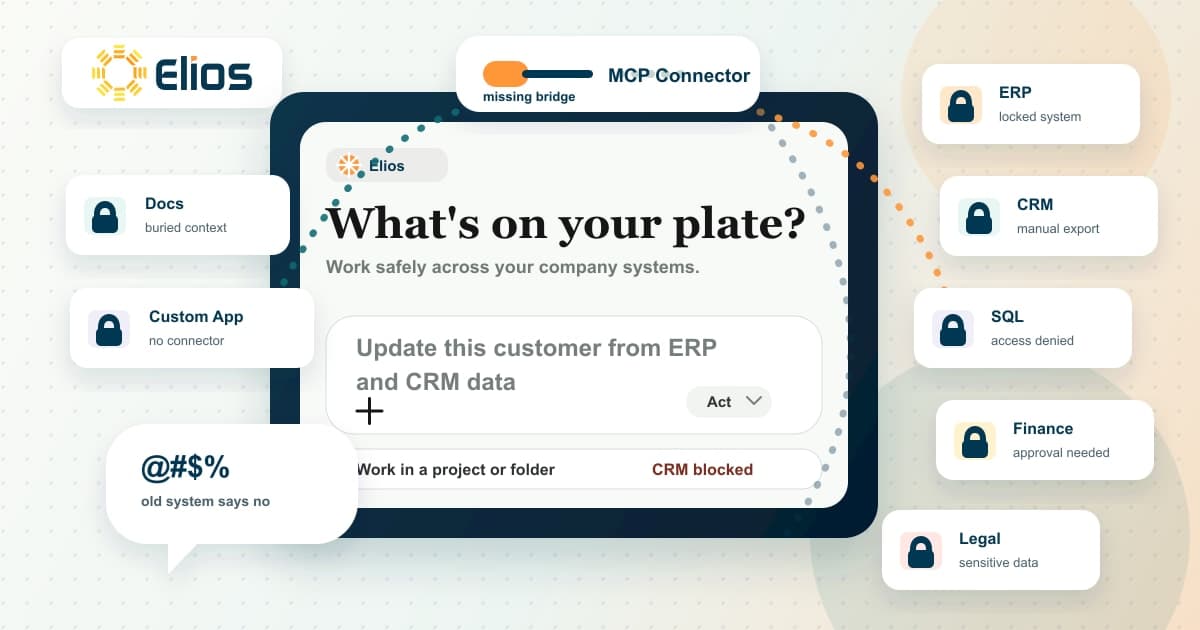
It can write the summary, draft the analysis, and explain the next step. Then it hits the wall: the answer lives in the ERP, the CRM, the SQL database, the legal system, the finance platform, the project tool, or a custom internal app no agent can safely access.
When that happens, the work turns into browser workarounds, screenshots, copy-pasted exports, and manual lookups. If the agent needs a CSV from finance, a screenshot from an ERP, and a person checking three tabs before it can answer, the company has an access problem.
The cost is practical: stale CRM notes, slow client follow-up, delayed job costing, finance reports assembled by hand, and operators asking AI questions it cannot safely answer. That is the practical reason to care about MCP.
What is an MCP server?
MCP stands for Model Context Protocol. It is an open standard for connecting AI applications to external tools, data, and workflows.
An MCP server is the service that exposes those tools and data to an AI application. Think of it as a governed front door. The AI application asks for something it is allowed to do, the MCP server checks what is available, and the connected business system returns the result.
In Claude, remote MCP servers are often called custom connectors. Business readers may hear "MCP server," "MCP connector," or "Claude connector" and assume they are separate ideas. In practice, they are often describing the same layer: the approved connection between an agent work surface and the systems your company already uses.
That connection matters because AI-native companies are not defined by seat licenses. They are defined by whether AI can participate in the real work, with the right access, the right rules, and the right people reviewing important decisions.
If you want the broader operating model, read our guide on how to make your company AI-native. This post is about the access layer underneath it.
Why MCP matters to operators
Most companies already own the data they need. The problem is reach.
Customer history sits in HubSpot or Salesforce. Operational truth sits in an ERP. Reporting lives in Snowflake, a SQL database, Power BI, or a finance workbook. Legal context lives in a matter system. Project status lives in a project tool. The real edge case lives in a custom app someone built seven years ago and everyone still relies on.
Without a connector, an agent can only work around those systems. It can ask you to paste data. It can use a browser like a person. It can summarize whatever you upload. That may be useful for one task, but it is not how a company changes how work gets done.
With an MCP connector, the agent can ask approved questions and take approved actions through the system boundary. It can look up an account, read a project record, fetch invoice status, draft a CRM update, search a knowledge base, or propose a support handoff.
The payoff is practical: fewer manual lookups, faster exception handling, cleaner handoffs, fresher reports, and a tighter audit trail around agent-assisted work.
The important word is approved. The point is not to give an agent unlimited access. The point is to give the right agent, acting for the right person, the right capability.
What this looks like in real workflows
The first useful MCP connector is usually attached to a workflow people already run by hand.
- Sales and revenue: an agent drafts an account brief from CRM history, call notes, open proposals, pricing rules, and recent follow-ups.
- Finance: an agent answers a margin or revenue question using the approved reporting source, not a pasted spreadsheet.
- Operations: an agent checks work orders, job status, invoice holds, and escalation history before drafting the next action.
- Professional services: an agent flags project margin risk using SOW terms, delivery plans, open invoices, and change-order history.
- Leadership: an agent prepares a weekly operating review from the CRM, ERP, finance, and project systems that already run the business.
None of those examples require the agent to own the system of record. They require a safe way to ask the system a useful question or propose a controlled update.
When an off-the-shelf connector is enough
Sometimes the answer is simple. If the system you use already has a well-maintained MCP connector, and it handles the access model your company needs, use it.
That can be enough for common systems where the connector respects user permissions, exposes the right tools, and fits the workflow. You do not need custom engineering for every system. If the connector safely does the job, take the fast path.
The test is practical:
- Can the agent reach the system without browser workarounds?
- Can it see only what the person is allowed to see?
- Does it expose the specific actions your workflow needs?
- Can you audit what happened?
- Can you turn off risky actions?
If the answer is yes, you probably do not need a custom MCP server for that system.
When you need a custom MCP server
A custom MCP server starts to make sense when the system is important and the default connection is missing, unsafe, or too generic.
That shows up in a few common places:
- A legacy ERP that runs core operations but has no modern connector.
- A legal CRM or matter system with sensitive client data.
- A custom internal app that runs a workflow no vendor understands.
- A SQL database or Snowflake environment where the agent needs approved queries, not open-ended access.
- A finance platform where some users can read reports, while only a smaller group can draft or approve updates.
- A vendor system that gives you one API key and expects you to figure out the rest.
The custom MCP server becomes the controlled interface. It decides which tools exist, which data can be requested, which writes are allowed, what needs approval, and what gets logged.
That last part matters. The safest connector is often the one with fewer tools, better names, clearer permissions, and a real audit trail.
The permissions problem
Permissions are where MCP gets real.
Some systems can inherit a person's permissions. If the user signs in with OAuth or SSO, the connector can often be constrained by that person's access plus the company's tool policies. That is the cleaner model, because the agent works inside the same identity boundary as the human it is helping.
Other systems are messier. They may only provide an API key, a service account, or an integration user. That is common in older systems, custom software, and some line-of-business tools.
In that world, the custom MCP server may need to mirror and narrow the permission layer. It should fail closed, use least-privileged service accounts, and decide which people, groups, and roles can use which tools. It may need to enforce that finance can read margin reports, operations can update project status, legal can search matter records, and everyone else gets no access.
This is also where identity matters. Many companies run permissions through Microsoft Entra ID, still commonly searched as Azure Active Directory. A custom MCP server can use that identity layer to make access decisions, instead of hiding everything behind one shared key.
The business point is simple: AI access should follow company access. If the underlying system cannot enforce that cleanly, the connector has to help.
What security teams should require
MCP does not make access safe by existing. The connector still needs policy, logging, and sensible limits. A record the agent retrieves should not be able to authorize its own update.
Security teams should expect:
- Delegated identity through OAuth or SSO when the underlying system supports it.
- Least-privileged service accounts when the system only supports integration users.
- Separate read tools from write tools.
- Human approval for sensitive updates, external sends, or financial actions.
- Audit logs that show who asked, which tool ran, what data was touched, what changed, and who approved it.
- Clear revocation when someone changes roles or leaves the company.
That is how a connector becomes a control surface, not a back door.
What a custom MCP server can safely expose
The best custom MCP servers usually start smaller than people expect.
Useful tools might look like:
- Search accounts by name.
- Read open opportunities for an account.
- Fetch invoice status for a customer.
- Look up project status by project ID.
- Search approved legal matter summaries.
- Run a saved SQL query with fixed parameters.
- Draft a CRM note for human review.
- Propose a project update, but require approval before writing.
Notice the shape. These tools are named around business work. They are not generic database access. They do not ask the agent to invent the safest way to query a production system. They give the agent a safe path to do a useful job.
That is how MCP becomes operational infrastructure instead of another AI experiment.
How Elios helps with custom MCP servers
At Elios, we treat MCP as part of the engineering floor for becoming AI-native. If your data and tools are locked away from agents, the work will keep falling back to manual exports, browser workarounds, and one-off prompts.
The work usually starts with one system and one workflow. We map the users, permissions, source system, approved actions, review points, and audit needs. Then we expose the smallest useful connector surface and prove it with humans reviewing the important steps.
Our MCP connector accelerator supports custom MCP servers, including a Microsoft Entra ID auth foundation for the Azure Active Directory model many companies still use. That means we do not start from a blank page every time we need role-aware access, identity-aware tools, and governed connector behavior.
When Elios deploys with you, the accelerators come with us and stay with you. We customize the code for your environment, and your version of it is yours to keep. It can live in your cloud, your VPC, or an on-prem environment if that is where the work has to run.
That ownership matters. A CIO is much more likely to accept an AI access layer when the company controls the code, the deployment, the permissions, and the audit trail.
The same principle applies after the first connector is running. Elios can deploy AI-native specialists who keep extending the capability, maintain the workflows, and help your team operate the system without becoming dependent on us.
A developer companion for the technical version
I wrote a short ebook, Build Your First MCP Server, before joining Elios. It is still relevant, but it is written for software developers.
The guide walks through the implementation version of this idea: wrapping existing APIs, exposing useful tools, handling authentication, and testing the MCP server from an AI client.
If your technical team wants to see how the pattern works in code, it is a useful companion. Operators do not need the ebook to understand the business case.
FAQ about MCP servers
What is an MCP server?
An MCP server is a service that lets an AI application access approved tools, data, and workflows through Model Context Protocol. It gives the AI application a structured way to ask for business context or take an approved action.
Is an MCP server the same as a Claude connector?
Often, yes. Claude commonly uses the word connector for remote MCP servers. The practical idea is the same: a governed connection between the agent work surface and an external system.
Why would a company need a custom MCP server?
A company may need a custom MCP server when an important system has no connector, when the default connector does not match the workflow, or when access needs stricter controls. Legacy ERP, legal systems, SQL databases, Snowflake, finance platforms, and custom internal apps are common examples.
Does an MCP server replace my CRM, ERP, or database?
No. Your CRM, ERP, SQL database, Snowflake warehouse, finance platform, legal system, and project tools remain the systems of record. The MCP server gives AI a governed way to use them.
How do MCP servers handle permissions?
Some MCP connectors can inherit a person's permissions through OAuth or SSO. Others connect to systems that only provide an API key or service account. In those cases, the custom MCP server may need to mirror and narrow the permission layer so each user, group, or role can only use approved tools and see approved data.
If your AI keeps hitting locked doors
If Claude, Cowork, Codex, or another agent keeps asking for exports, screenshots, pasted records, or browser access, your company probably has an AI access problem.
That problem does not need to start as a giant platform project. It can start with one system and one workflow: a CRM update, an ERP lookup, a legal search, a finance report, a project handoff, or a custom app that still runs the business.
Bring us one system and one workflow where AI keeps getting blocked. We will map the connector surface, permissions, and first safe deployment path, then deploy the right people to leave the capability behind.
Give us one problem. Let us prove it.